battery replacement -How to Replace Your Phone’s Battery the Right Way
Your phone’s battery worn out? Learn how to replace your phone’s battery safely and easily while extending its lifespan with this comprehensive guide on battery replacement.
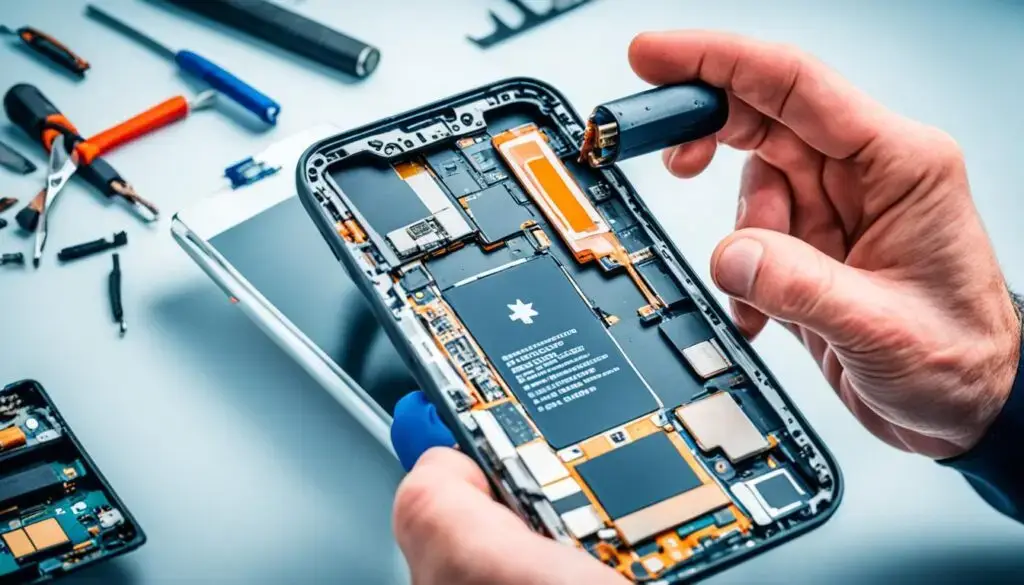
How to Replace Your Phone's Battery
We may earn a commission when you purchase through links on this page, at no additional cost to you.
How to Replace Your Phone’s Battery: Your phone’s battery doesn’t last forever. It wears down over time, causing issues such as rapid battery drain or sudden power-offs. Unlock the power of your iPhone with this comprehensive guide.
You might also encounter overheating or a swollen battery. Changing the battery can make your phone last longer. This guide shows you how to safely swap your phone’s battery. We’ll also share how to keep your new battery in top shape.
How to Replace Your Phone’s Battery Key Takeaways
- Smartphone makers hope their batteries will retain at least 80-85% of their capacity after two years.
- If your phone suddenly turns off or restarts frequently, it might be time for a new battery.
- Apple recommends replacing the battery if it falls below 80% health or after about 500 charges.
- By the third year, your phone could really use a new battery because of all the charges it’s gone through.
- Changing your phone’s battery at a service center typically costs between $50 and $100, including labor and taxes.
Signs Your Phone Battery Needs Replacing
Over time, your smartphone’s battery can weaken. It’s important to know the signs of a bad battery. This will help keep your phone working well for longer. Watch out for signs that it’s time to replace your phone’s battery.
Rapid Battery Drain
If your phone is dying quickly, the battery may be degrading. Normally, phone batteries last 2 to 3 years. But if it’s running low much faster, it’s probably time for a new one. iPhone Camera tips and tricks to better use your camera.
Unexpected Shutdowns
Your phone might shut off unexpectedly if the battery is old. This occurs when the battery can’t keep up with the phone’s power demands. If your phone often dies at 30% or higher, the battery could be the issue.2
Overheating Issues
If your phone feels hot even with light use, the battery might be to blame. A failing battery can make a phone overheat. Monitor your phone’s temperature to catch this issue early.
Swollen or Deformed Battery
A swollen or distorted battery is dangerous. This is a sign that it needs to be changed. If your phone’s shape changes, it could be the battery. Stop using it and replace the battery quickly.
Looking out for these signs and caring for your battery can make your phone last longer. If you suspect your battery is faulty, use a tool like AccuBattery to check. This could help you know if it’s time for a new one.
Safety Precautions for Battery Replacement
Before you change your phone’s battery, it’s vital to follow safety steps. Do this to avoid electrical accidents or other dangers.
Power Off the Phone
Start by turning your phone off.3 This stops electricity from flowing, which makes the replacement safer.
Work in a Well-Ventilated Area
Change the battery in a place with good airflow. A well-ventilated spot lowers risks tied to lithium-ion battery safety, plus avoids fume and gas buildup.
Wear Safety Gear
It’s important to protect yourself when handling a battery. Put on safety glasses, gloves, and a helmet to protect yourself from battery acid and other hazards.
Keep the Work Area Dry
Make sure your work area is dry and free of water. Doing this lowers the risk of short circuits and damage, making your repair safer.
Following these safety steps can reduce risks when replacing your phone’s battery. This results in a smooth, worry-free process.
Tools Needed for Battery Replacement
Replacing your smartphone battery requires some essential tools. You need to find a battery replacement kit that’s right for your phone model. Also, you’ll need a set of screwdrivers, plastic tools, and adhesive strips or tape. These tools help remove the old battery and install a new one smoothly.
A good phone repair kit makes this job easier. Having the right tools lets you do the job well without damaging your phone. Make sure you have all the required tools to make the battery replacement hassle-free. Shop Battery replacement tool kits.
| Tool | Purpose |
|---|---|
| Replacement Battery | A compatible battery for your specific phone model |
| Screwdriver Set | To disassemble the phone and access the battery |
| Plastic Prying Tools | Carefully remove the old battery without damaging the phone |
| Adhesive Strips or Double-Sided Tape | Secure the new battery in place after installation |
With the right battery replacement tools and a bit of patience, you can replace your phone’s battery. Always follow the manufacturer’s instructions. This is key to a safe and successful battery swap.
Step-by-Step Guide to Replace Your Phone’s Battery
Swapping your phone’s battery is easy if you do it right. Following the right steps makes sure it works well and is safe. A detailed guide is available to help you every step of the way.
Open the Phone Case
First, turn off your phone. Then remove the screws on the back to open the case. Be careful when you do this.
Remove the Old Battery
Once the case is open, find the old battery. Disconnect it from the phone, then remove it gently. Phone batteries often last 2 to 3 years before they start to lose capacity.
Insert the New Battery
Put in the new battery carefully. Make sure to connect it back to the phone. It’s best to use well-known battery brands for your phone type. This reduces risks.
Close the Phone Case
Finally, put the case back on and tighten the screws. This wraps up changing the battery.
It’s hard to know exactly how much your battery has worn down since you got your phone. Most phones still hold 80 to 85% of their original power after two years. Apple advises iPhone users to get a new battery if it’s less than 80% okay, or about 500 charges.
A new battery at an official shop costs $50 to $100. This includes the cost of the battery, the work, and taxes. Services like this can cost more than some low-priced phones, making a new phone seem more appealing. Still, changing the battery is cheaper than buying a new phone. It can extend the lifespan of old phones.
Visit an Authorized Service Center
If you don’t feel confident changing your phone’s battery, take it to an
authorized phone repair
center. Here, you’ll be sure to get a real replacement battery. The repair will be performed using genuine parts. They’ll even fix the water-resistance seals.
Apple Service Centers
Apple has designated locations for iPhone battery replacements.
Apple’s authorized service centers
are the best for getting your iPhone fixed. If your battery drops below 80% capacity, AppleCare+ will cover the change.
Samsung Service Centers
For Samsung Galaxy users, there’s help too.
phone battery replacement service
In the US and Canada, uBreakiFix does out-of-warranty Galaxy repairs, including battery swaps.
Google Pixel Repair Centers
Google Pixel owners are also in luck.
smartphone service centers
With uBreakiFix, you can change your Pixel’s battery even after the warranty ends. They use real parts for a top-notch job.
Mail-In Repair Services
If you can’t take your phone to a service center, you can use mail-in repair. Big names like Apple, Samsung, and uBreakiFix provide this service. You just need to send your device to their repair center. This is perfect if you don’t have a nearby service center.
Apple Mail-In Repair
Apple offers a special mail-in repair for iPhones and its other devices. Every repair gets a 180-day warranty on parts and labor. They fix things like cracked screens, batteries, and cameras. Just go to Apple’s support site, fill in your info, and you’ll get a shipping label to send it off.
Samsung Mail-In Repair
For Samsung devices, there’s a mail-in repair too. They have a clear process for filling in your device and contact details. You can choose your shipping method, including UPS Ground and Next Day. Prices start from $6 for USPS Priority.
uBreakiFix Mail-In Repair
uBreakiFix is also in on the mail-in repair game. They give a 180-day warranty on the work. Services include battery swaps, screen repairs, and water-damage repairs.8 They advise on how to pack your device to keep it safe while it’s being fixed.
How to Replace Your Phone’s Battery
Getting your cellphone battery replacement done usually costs $50 to $100. This price is from a certified service center and includes labor and taxes. It’s a better choice than getting a new top-notch phone, saving a lot of money. Yet, the cost might not be worth it for cheaper phones. For them, fixing the battery could cost almost as much as the phone itself.
When it comes to smartphone battery replacement, you can take it to an official service center or use a mail-in service. Either way, it’s not as expensive as buying a new phone.
| Service Provider | Battery Replacement Cost |
|---|---|
| Apple Service Centers | $49 – $99 |
| Samsung Service Centers | $59 – $99 |
| Google Pixel Repair Centers | $79 – $99 |
For many people, replacing a phone battery can be a big deal. This is especially true for those with older or less expensive phones. Nevertheless, changing the battery is usually more economical than buying a new phone.
DIY Phone Battery Replacement
Some phone makers have made it hard to get real replacement parts. But the right-to-repair movement is making things better. Now, you can buy DIY battery replacement kits and learn how to use them. Websites like iFixit offer tools and guides for replacing your phone’s battery yourself.
Repair Kit and Tutorials
The iFixit kit includes a third-party battery and the right tools. It can replace Apple’s £49 ($49) official battery service quite well.10
Challenges of DIY Repair
Fixing a battery yourself can be challenging, especially for waterproof phones. You might need to use a hair dryer to warm up the phone. But be careful because doing it wrong can cause problems. Plus, DIY might void your warranty, but warranties are usually only 12 months. By then, your warranty may already have expired.
For older or cheaper phones, like the iPhone 6, doing it yourself can be smart. But for new, expensive phones, it’s better to get help from the maker. This way, you ensure the fix is safe and won’t harm the phone’s special features.
Tips for Extending Battery Life
Keeping your smartphone’s battery healthy is key to extending its lifespan. Use simple tips to preserve the battery. These actions will help your phone’s battery last longer before needing replacement. Find more helpful advice in other sources to improve your phone’s battery life.
Lower Screen Brightness
Dimming your screen’s brightness is simple but powerful. It reduces how much power your phone uses. This means your battery will last longer. Plus, AARP members get 10% off at Carrabba’s Italian Grill when they order in or pick up. This is a nice bonus that makes keeping your battery healthy less costly.
Disable Unused Apps
Turning off apps and features you don’t need also saves energy. Apps running in the background can quickly use up your battery. So, it’s smart to go through your phone regularly and delete what you don’t use.
Avoid Extreme Temperatures
Your phone doesn’t like very hot or very cold weather. These extremes can harm the battery’s health. Keep your phone in a temperature-controlled environment to maintain its battery life. This simple action helps prevent the battery from degrading prematurely.
How to Replace Your Phone’s Battery FAQ
What are the signs that my phone’s battery needs replacing?
Your phone may need a new battery if it drains quickly, shuts down unexpectedly, overheats, or has a bulging battery.
What safety precautions should I take when replacing my phone’s battery?
Turning your phone off is the first step. Make sure the room is well ventilated, and wear eye protection and gloves. Keep water away from your workspace, too.
What tools do I need to replace my phone’s battery?
You’ll need the right battery for your phone model, a set of screwdrivers, plastic prying tools, and adhesive tape.
How do I replace my phone’s battery?
First, power off your phone. Then, open the case with a screwdriver, remove the old battery, install a new one, and close the case.
Where can I get my phone’s battery replaced?
To replace your phone’s battery, take it to a service center or use a mail-in service. Trusted options are Apple, Samsung, and uBreakiFix.
How much does it cost to replace my phone’s battery?
Usually, it costs between and 0 to replace your phone’s battery at a service center. This price includes labor and taxes.
Can I replace my phone’s battery myself?
Yes, you can do it at home with the right tools, but it’s hard. Look for guides on sites like iFixit. Be careful not to damage your phone.
How can I extend the lifespan of my phone’s battery?
To make your battery last longer, reduce the screen brightness and set a shorter timeout. Also, turn off what you’re not using, update your phone, and avoid very hot or very cold environments.
How to Replace Your Phone’s Battery Source Links
More Tech Articles
- https://www.androidauthority.com/cellphone-battery-replacement-982247/
- https://www.asurion.com/connect/tech-tips/signs-you-need-to-replace-your-android-phone-battery/
- https://www.instructables.com/How-to-Change-a-Car-Battery-1/
- https://www.carlcare.com/ng/tips-detail/how-to-repair-faulty-phone-battery/
- https://support.apple.com/iphone/repair/battery-replacement
- https://myjewelryrepair.com/watch-repair/mail/
- https://ifixscreens.com/device-mail-in-repair/
- https://phonedoctors.com/mail-in/